File access control
Nextcloud’s File Access Control app enables administrators to create and manage a set of rule groups. Each of the rule groups consists of one or more rules. All rules within a group must match (AND). Access is denied if any deny rule group matches (OR between groups). If no group matches, the app does not impose additional restrictions; normal file and share permissions still apply. Rule criteria include IP addresses, user groups, collaborative tags and other criteria.
Denied access
When a deny rule group matches, the user cannot perform the following operations through Nextcloud:
Create/upload the file
Modify the file
Delete the file
Download the file
Synchronize the file with clients, such as the Nextcloud desktop and mobile clients
Denied files can still appear in directory listings. File Access Control does not guarantee that file names or other metadata are hidden.
Warning
The Context Chat App is not affected by File Access Control rules and may return indexed information even when a file is not accessible by the user due to access control rules.
Rules do not revoke copies that users have already downloaded or synchronized. The app’s storage wrapper is not enabled for command-line execution, including CLI background jobs. Direct access to the underlying storage is also outside the app’s enforcement.
Examples
After installing the File Access Control app as described in Apps management
navigate to and add a
Block access to a file flow.
Despite its name, this operation also applies to folders. A rule that matches a folder does not necessarily match each file inside it. To match files based on a collaborative tag assigned to a parent folder, see Denying access to folders.
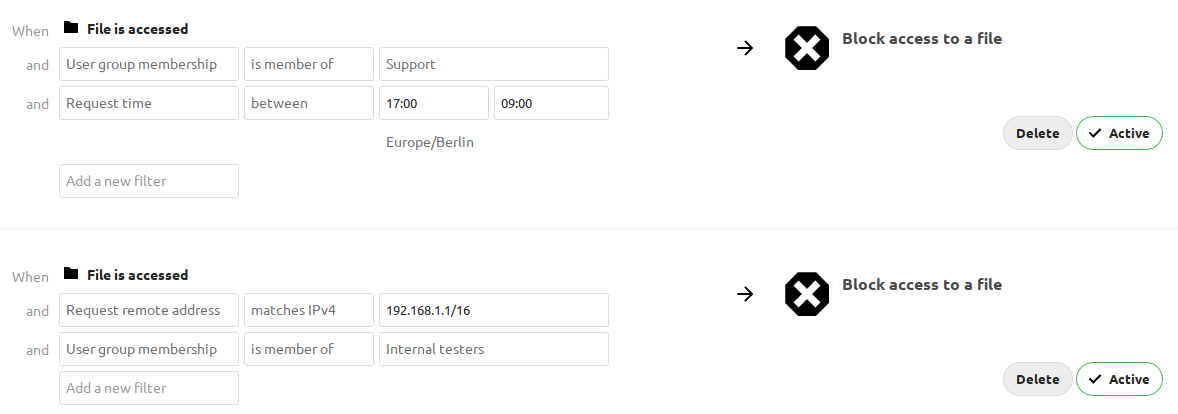
The first rule group Support only 9-5 denies any access to files for users
of the Support user group, between 5pm and 9am.
The second rule group Internal testing prevents users of the Internal
testers group to access files from outside of the local network.
Denying access to folders
The easiest way to block access to a folder, is to use a collaborative tag. As mentioned in the Available rules section below, either the file itself or one of the parents needs to have the given tag assigned.
Assign the tag to the folder or file, then add a rule group that blocks
access when the tag matches. For an is tagged with condition, a tag on a
parent folder also makes the tag condition match for files inside it, but the
rule group denies access only when all its other conditions also match. The tag
check is independent of the user’s permissions for the tag. Therefore restricted
and invisible tags are recommended; otherwise a user could remove and reassign
the tag.
This example blocks access to any folder with the tag Confidential.

Prevent uploading of specific files
You can block uploads based on the MIME type Nextcloud determines for a file. A regular expression can match several MIME types associated with the file type you want to block.
For example, select the matches operator and use
/^application\/(zip|x-zip-compressed)$/i to block files recognized as
application/zip or application/x-zip-compressed.
Warning
MIME type checks are not a guarantee of content inspection. Depending on the storage backend and whether the file already exists, Nextcloud may use cached metadata, inspect an existing local file, or infer the MIME type from the file name. For a new file, the check can rely on its name rather than its uploaded contents. Renaming a file can therefore affect whether an upload is blocked.
The same MIME type rule also restricts access to matching existing files; it is not limited to uploads.

Troubleshooting
Blocking user groups
When trying to deny access to a group, public link sharing may allow otherwise restricted users a way past access control rules. For example, an unauthenticated visitor via a public link is not a member of any group.
A user able to utilize (or create) a public link can log themselves out then visit the public link to access a purely group restricted file because a rule blocking members of a specific group will never match. Access is still subject to other matching rules and the public link’s permissions.
To also deny matching anonymous requests, add a separate rule group with the
same other conditions, but replace the original group-membership condition
with a not member of condition for a group containing all users.
This additional group blocks matching public-link requests from all unauthenticated visitors, not just members of the originally blocked group. It also blocks matching requests from authenticated users who are missing from the all-users group.
Request-based conditions
The user agent is supplied by the client and can be changed or spoofed. Do not treat a user-agent condition as proof that a request comes from a particular trusted application.
For example, to block file access from the Nextcloud desktop client:
In , add a new
Block access to a fileflow.Add a
Request user agentrule, selectis, and chooseDesktop client.Save the flow.
With this rule as the only condition, requests matching the desktop client’s user agent are denied access to files. To limit the rule to particular users or files, add conditions to the same group; all conditions must match. Because user agents can be spoofed, a user can bypass this rule by changing the user agent sent by the client.
IP-based rules depend on the remote address Nextcloud resolves for the request. If you use a reverse proxy, configure trusted proxies and forwarded headers correctly. Test rules using the actual proxy configuration and clients; also confirm all relevant Nextcloud setup checks pass.
External storage
Matching rules restrict access to external storage through Nextcloud. They cannot prevent users with direct access to that storage from reading or changing files outside Nextcloud.
Disable Allow users to mount external storage if users should not be
able to configure their own mounts. This does not revoke existing credentials
or prevent direct access to the external storage.
Available rules
Each rule offers operators appropriate to its criterion, including negative
operators. String-based rules also support regular expressions through
matches and does not match.
File collaborative tag: Either the file itself, or any of the file owner’s parent folders needs to be tagged with the tag.
Note
Tags used in access control rules should be restricted tags, otherwise any user can remove the tag to access the file again. The best way to do this is with the Automated tagging of files.
File MIME type: The MIME type of the file, e.g.
text/plainfor a text file orhttpd/unix-directoryfor a folder.Note
Detected types and custom mappings can differ. See Mimetypes management for details about Nextcloud’s MIME type mapping, including customization.
File name: The base name of the file, not its full path.
isandis notare case-insensitive. Regular expressions are case-sensitive unless a modifier such asiis used.File size (upload): A size comparison using HTTP request headers. The check uses
OC-Total-Lengthwhen present, otherwiseContent-Lengthfor POST and PUT requests. It does not measure the stored file. The result depends on the headers supplied by the client; a request-body length is not necessarily the complete file size. If the size is unavailable or invalid, the size condition does not match, so a rule group containing it does not deny access for that request.Request remote address: An IPv4 or IPv6 range in CIDR notation, such as
192.0.2.0/24or2001:db8::/32.Request time: A daily time span and timezone. Time spans can cross midnight.
Request URL: The URL of the request performing the file operation, including its scheme, host and path, but excluding the query string. This is the URL of the request being evaluated, not necessarily the URL displayed in the user’s browser.
Request user agent: The client-supplied user agent. Nextcloud desktop, Android and iOS clients, and Thunderbird and Outlook add-ons, are available as preconfigured options.
User group membership: Whether the currently authenticated user is a member of the given group, not whether the file owner is a member. Unauthenticated visitors match
is not member ofand do not matchis member of.